
Charger and Cable Management: How to Clean Up Your Desk, Nightstand, and Travel Setup.
Charger clutter usually happens slowly. One phone cable becomes three. A laptop charger stays on the floor. A power strip fills up. Then your desk, nightstand, or travel bag turns into a knot of USB-C cables, adapters, and half-used chargers.
The fix is not buying more random accessories. The fix is building a cleaner charging system: fewer chargers, better cable routes, smarter storage, and the right charging station for the devices you actually use.
Cleaner charging starts with fewer decisions.
One good charger, the right cables, and a dedicated charging zone can make your setup feel calmer and easier to use.
Why Trust USBHubShop
USBHubShop helps readers compare USB-C hubs, chargers, cables, docking stations, and accessories using plain-English compatibility guidance.
-
Independent by design
USBHubShop does not manufacture USB-C accessories or sell its own competing charger, cable, hub, or docking station line. -
Compatibility-led, not promotional
Guides are built around device compatibility, charging standards, port support, cable requirements, and practical buyer use cases. -
Clear and accountable
Articles are written under a consistent editorial process with visible update dates, affiliate disclosures, and clear responsibility for corrections. -
Maintained with intent
USB-C standards, charging speeds, cable ratings, device requirements, and product availability can change. Guidance is reviewed and updated as the category evolves.
Affiliate disclosure: USBHubShop may earn a commission when you buy through links on this page, at no extra cost to you. We focus on helping you choose USB-C chargers, cables, hubs, power strips, and organization accessories that match your actual setup.
Quick answer
The best charger and cable management setup uses fewer chargers, shorter visible cable runs, labeled or separated cables, and one dedicated charging area for daily devices. For most people, a multi-port USB-C charger, a few high-quality cables, a cable tray or clips, and a small travel organizer will clean up the setup better than buying more random chargers.
Organize by device, not by drawer.
Before buying anything, list the devices you charge daily: phone, laptop, tablet, watch, earbuds, power bank, camera, or gaming handheld. Then build your charging setup around those devices instead of keeping every old cable “just in case.”
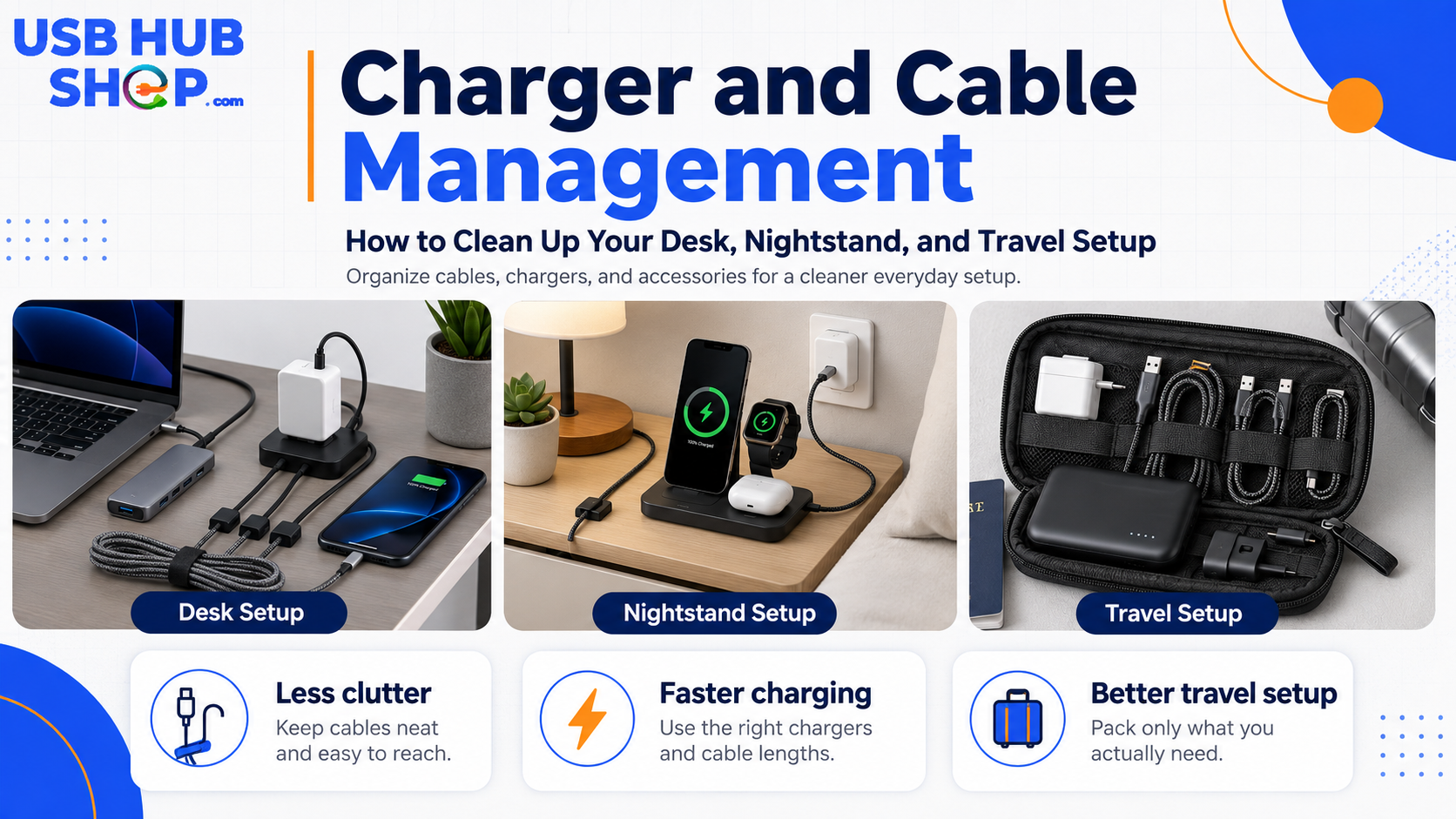
A cleaner charging setup usually starts with fewer chargers, better cable placement, and one organized place for daily devices.
Why charger clutter happens
Most charging clutter comes from mixing old chargers, new USB-C devices, leftover Lightning or micro USB cables, travel adapters, power strips, and extra cords in the same space. The result is a setup that works, but feels messy and inefficient.
A cleaner setup does not have to be expensive. The real goal is to reduce the number of loose cables, place chargers where they belong, and make every cable serve a clear purpose.
Clean setup
One charging zone, fewer adapters, better cable routing, and the right cable length for each device.
Messy setup
Too many old chargers, random cable lengths, overloaded outlets, and no dedicated place for daily devices.
The best charger and cable management setup by area
Your desk, nightstand, and travel bag need different solutions. Do not use the same organization strategy everywhere.
| Area | Best setup | What to avoid |
|---|---|---|
| Desk | Multi-port USB-C charger, cable tray, cable clips, and one routed laptop cable. | Loose wall chargers and cables hanging across the workspace. |
| Nightstand | MagSafe or Qi2 stand, watch charger, short cable, and a small power strip hidden behind furniture. | Long cords on the floor and chargers falling behind the bed. |
| Travel bag | Compact USB-C charger, two cables, travel cable pouch, and one backup adapter. | Carrying every cable you own. |
| Family charging area | Charging station with labeled cables and dedicated slots for phones, tablets, and earbuds. | Everyone using random outlets around the house. |
| Workstation | USB-C docking station or powered hub with hidden cable routing. | Running every accessory directly into the laptop from different directions. |
Route cables away
Use clips, trays, and a multi-port charger to keep the top of the desk clear.
Make charging easy
Use a stand or short cable setup so your phone is easy to place and remove.
Carry less
A compact charger and two reliable cables beat a pouch full of duplicates.
Step 1: remove chargers you no longer need
Start by pulling out every charger and cable in the area. Separate them into three groups: daily use, occasional use, and outdated or unknown. This is the fastest way to see what is creating the mess.
Old low-power USB-A chargers may still work, but they are not always the best main charger for modern USB-C phones, tablets, or laptops. If most of your devices now use USB-C, your setup should shift toward USB-C chargers and USB-C cables.
Do not keep mystery cables in the main setup
If you do not know what a cable is for, remove it from the daily charging area. Keep one small backup pouch if needed, but do not let unknown cables live on your desk or nightstand.
Step 2: choose one main charger
Instead of using three or four wall adapters in one area, use one good multi-port charger when possible. A multi-port USB-C charger can power a phone, tablet, earbuds, watch charger, or even some laptops depending on wattage and port layout.
For desks and travel, this is one of the biggest clutter reducers. For more help choosing the right wattage, read the 20W vs 30W vs 45W USB-C Charger guide and the Best Multi-Port USB-C Chargers guide.
Phone only
A compact USB-C charger may be enough for one phone and simple daily charging.
Phone + tablet
A multi-port charger can reduce wall clutter and keep devices in one zone.
Laptop + devices
Check wattage carefully. Laptop charging needs more power than phone charging.
Step 3: use the right cable length
Cable length matters. Too-short cables are annoying. Too-long cables create loops and tangles. A clean setup usually uses the shortest cable that comfortably reaches the device.
For a desk, route longer cables behind or under the work surface. For a nightstand, use a shorter cable or magnetic charging stand. For travel, carry one short cable for power banks and one longer cable for hotel rooms, airports, and awkward outlets.
| Cable length | Best for | Buyer note |
|---|---|---|
| 1 ft / 0.3 m | Power banks, desk docks, and compact charging stations. | Great for reducing clutter when devices sit close to the charger. |
| 3 ft / 1 m | Everyday phone and tablet charging. | The best all-around length for many setups. |
| 6 ft / 2 m | Nightstands, couches, travel, and hard-to-reach outlets. | Useful, but manage the extra slack with clips or ties. |
| 10 ft+ | Special situations only. | Can create clutter and may not be ideal for every charging setup. |
For more detail, read the USB-C Cable Buying Guide.
Step 4: create a desk charging zone
Your desk should not have chargers scattered across the surface. Pick one charging zone. It can be a back corner, under-desk tray, monitor stand area, or side shelf.
Use a multi-port charger or charging station in that zone, then route cables from that single point. Cable clips can keep phone and tablet cables from sliding behind the desk. A cable tray can hide power strips and extra length.
Clean desk setup
One power source, hidden cable routing, short visible cable ends, and only daily devices on the desk.
Upgrade path
If your desk has monitors, Ethernet, storage, and accessories, consider a USB-C docking station instead of loose hubs and chargers.
Step 5: simplify your nightstand charging
A nightstand setup should be easy in the dark. If you fumble for cables every night, the setup is working against you.
For iPhone users, a MagSafe or Qi2 stand can reduce cable grabbing and keep the phone visible. For Apple Watch and earbuds, a 3-in-1 charging station may make sense. For Android users, a USB-C cable with a small stand or dock can keep the space clean.
Compare MagSafe vs USB-C Charging if you are deciding between wireless convenience and wired speed.
Step 6: build a travel charging kit
Your travel kit should be smaller than your home setup. Most people do not need five cables and four adapters in a travel bag.
One compact charger
Choose a multi-port USB-C charger that can handle your phone, tablet, and maybe your laptop.
Two main cables
Carry one USB-C cable for daily use and one backup or longer cable for awkward outlets.
One organizer pouch
Keep cables separated so they do not tangle with toiletries, keys, or other bag items.
Good cable management is really decision management.
The cleanest charging setups are not the ones with the most accessories. They are the ones where every charger, cable, and adapter has a reason to be there.
Best products to consider for a cleaner setup
You do not need all of these. Choose based on the area you are cleaning up.
| Product type | Best for | Shop / guide |
|---|---|---|
| Multi-port USB-C charger | Replacing several wall adapters with one cleaner charger. | Compare multi-port USB-C chargers |
| Charging station | Family devices, tablets, earbuds, phones, and shared charging areas. | See USB-C charging stations |
| Cable clips | Keeping cables from falling behind desks and nightstands. | See cable clips |
| Cable tray | Hiding power strips and extra cable length under a desk. | See under-desk cable trays |
| Travel cable organizer | Keeping cables, adapters, and power banks separated in a bag. | Compare travel cable organizers |
| MagSafe or Qi2 stand | Cleaner iPhone nightstand or desk charging. | Compare MagSafe vs USB-C |
Simple buying rule
Start with one good multi-port charger, the right cable lengths, and a dedicated charging zone. Then add cable clips, trays, stands, or organizers only where they solve a real clutter problem.
As an Amazon Associate, USBHubShop may earn from qualifying purchases.People also ask
How do I organize chargers and cables?
Start by removing chargers and cables you do not use daily. Then create one charging zone, use the right cable lengths, route cables behind furniture or under the desk, and store extras in a small labeled pouch or drawer.
What is the best way to manage charging cables on a desk?
Use one multi-port charger, an under-desk cable tray, cable clips, and short visible cable runs. Keep the charger and power strip off the main desktop when possible.
How do I clean up nightstand charging cables?
Use a short cable, MagSafe or Qi2 stand, or 3-in-1 charging station. Keep the power source behind or under the nightstand and use clips to stop cables from falling behind furniture.
Should I buy a multi-port charger?
A multi-port charger is useful if you charge several devices in one place. It can replace multiple wall adapters and make a desk, nightstand, or travel setup cleaner.
What should I keep in a travel charging kit?
A simple travel charging kit should include a compact USB-C charger, one or two reliable cables, a power bank if needed, and a small cable organizer pouch.
How do I stop cables from tangling?
Use shorter cables where possible, separate cables by device type, use cable ties or magnetic organizers, and avoid storing every cable loose in the same drawer or bag.
Sources and product details checked
USBHubShop reviewed this update as an evergreen charger and cable organization guide. The buying recommendations focus on practical setup choices: reducing duplicate chargers, using multi-port USB-C chargers where appropriate, selecting the right cable length, creating dedicated charging zones, and matching cable management accessories to the desk, nightstand, or travel use case.
