
Belkin USB-C Hub 7-in-1 Review: Useful Laptop Expansion, But Check the Exact Version.
The Belkin USB-C Hub 7-in-1 is designed to turn one USB-C port into a more useful laptop setup with ports like HDMI, USB-A, USB-C charging, SD card, and microSD, depending on the exact model. It can still make sense for MacBook, Chromebook, and Windows laptop users — but the specs matter.
One USB-C port. More laptop options.
A 7-in-1 hub can clean up a laptop setup fast — but only if the HDMI, charging, and data specs match what you need.
Why Trust USBHubShop
USBHubShop helps readers compare USB-C hubs, chargers, cables, docking stations, and accessories using plain-English compatibility guidance.
-
Independent by design
USBHubShop does not manufacture USB-C accessories or sell its own competing charger, cable, hub, or docking station line. -
Compatibility-led, not promotional
Guides are built around device compatibility, charging standards, port support, cable requirements, and practical buyer use cases. -
Clear and accountable
Articles are written under a consistent editorial process with visible update dates, affiliate disclosures, and clear responsibility for corrections. -
Maintained with intent
USB-C standards, charging speeds, cable ratings, device requirements, and product availability can change. Guidance is reviewed and updated as the category evolves.
Affiliate disclosure: USBHubShop may earn a commission when you buy through links on this page, at no extra cost to you. We focus on helping you choose USB-C hubs, chargers, cables, and laptop accessories that match your actual device and setup.
Quick answer
The Belkin USB-C Hub 7-in-1 can still be a useful laptop adapter if you need HDMI, USB-A ports, card readers, and USB-C pass-through charging in one compact hub. But Belkin has sold more than one 7-in-1 USB-C hub version, so you should check the exact model before buying — especially if you need 4K 60Hz HDMI, Ethernet, faster data transfer, or reliable laptop charging.
Do not buy a 7-in-1 hub by port count alone.
A hub can have seven ports and still be the wrong fit. Before buying, check the HDMI resolution and refresh rate, USB-C Power Delivery limit, USB-A data speed, card reader support, cable length, and whether your laptop supports the features you want through USB-C.
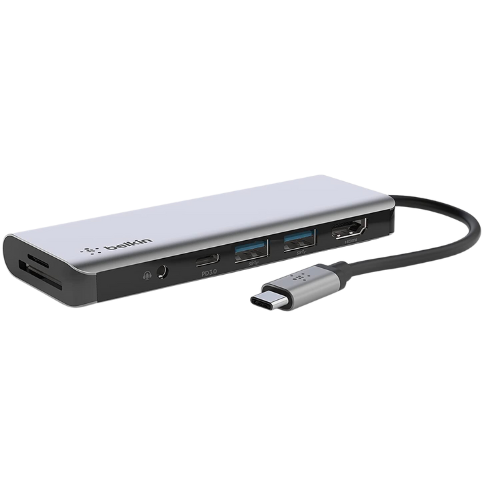
A compact laptop hub can still be useful — just confirm the exact ports, HDMI support, and charging specs before buying.
What is the Belkin USB-C Hub 7-in-1?
The Belkin USB-C Hub 7-in-1 is a compact multiport adapter made for laptops and tablets with USB-C ports. The idea is simple: instead of carrying separate adapters for HDMI, USB-A, SD cards, and charging, one hub gives you several connection options through one USB-C connection.
That makes the category genuinely useful. The part that needs attention is the exact version. Some Belkin 7-in-1 hubs are older and more basic. Some newer versions support stronger specs like higher HDMI refresh rates, faster data transfer, Ethernet, and stronger Power Delivery. Same “7-in-1” idea, very different buying decision.
Good fit
MacBook users, Chromebook users, Windows laptop users, students, remote workers, travelers, photographers, and anyone who needs HDMI, USB-A, and card readers.
Check before buying
HDMI resolution, 4K refresh rate, USB-C charging wattage, USB-A speed, Ethernet, SD card support, and laptop compatibility.
The specs that matter most
Most people look at a 7-in-1 hub and count the ports. That is a start, but it is not enough. Two hubs can both say “7-in-1” and perform very differently.
The biggest things to check are HDMI output, USB-C Power Delivery, USB-A transfer speed, whether Ethernet is included, and whether the hub supports your laptop’s display behavior. A hub that is fine for basic office work may not be the right hub for a creator, gamer, photographer, or dual-monitor setup.
Do not assume every USB-C port supports everything
Your laptop’s USB-C port must support the feature you want. Some USB-C ports charge but do not support video output. Some hubs support pass-through charging but do not include their own charger. Match the hub, the laptop, the cable, and the charger.
Belkin USB-C Hub 7-in-1 buying guide
Use this table before buying or keeping an older Belkin 7-in-1 hub. The goal is not to chase the fanciest spec. The goal is to avoid buying the wrong hub for your actual setup.
| Feature | What to check | Best buying move |
|---|---|---|
| HDMI | Check whether it supports 4K 30Hz or 4K 60Hz. That difference matters for monitor smoothness. | See USB-C hubs with HDMI |
| USB-C charging | Check the pass-through charging wattage and remember that the hub may reserve some power for itself. | Compare 65W vs 100W chargers |
| USB-A ports | Check whether they are for basic accessories, faster data transfer, or both. | Fix slow USB-C hub transfer speed |
| SD and microSD | Useful for photographers, creators, cameras, dash cams, drones, and content workflows. | See camera and SD card hubs |
| Ethernet | Some 7-in-1 models include Ethernet, while others do not. Check before buying. | See USB-C hubs with Ethernet |
| Laptop compatibility | MacBook, Chromebook, iPad, and Windows laptops can behave differently with displays and charging. | Check the USB-C compatibility guide |
Check 4K support
If you use an external monitor, confirm whether the hub supports the resolution and refresh rate you want.
Check charging wattage
Pass-through charging is useful, but only if it supplies enough power for your laptop and setup.
Match your workflow
Card readers, USB-A ports, Ethernet, and display support should match what you actually plug in.
Should you buy it in 2026?
Maybe — but only if the exact version matches your setup.
The Belkin USB-C Hub 7-in-1 can still make sense if you want a compact, reputable laptop hub for HDMI, USB-A accessories, SD cards, and basic workstation expansion. It is especially useful if your laptop has very few ports and you want one travel-friendly adapter.
But if you are buying for a newer MacBook, a high-resolution monitor, an Ethernet-dependent desk setup, fast external drives, or a more demanding workstation, compare the specs carefully. A newer USB-C hub, USB4 hub, or Thunderbolt dock may be a better fit.
Still a smart category. Just do not buy blindly.
A Belkin 7-in-1 USB-C hub can be a clean laptop upgrade. The mistake is assuming every version supports the same HDMI, charging, Ethernet, and data features. Check the exact model, then buy for your real setup.
Better alternatives to consider
If the Belkin 7-in-1 hub does not match your display, charging, or data needs, look at newer USB-C hubs and docking options before settling.
For simple laptop expansion
A 7-in-1 USB-C hub can still be a strong pick if you need HDMI, USB-A, card readers, and pass-through charging in a compact adapter.
For stronger monitor support
If you care about smoother external display performance, look for USB-C hubs with clear 4K 60Hz HDMI support.
You can also start with the Best USB-C Hubs guide, the Best USB-C Hubs With HDMI guide, or the USB-C Hub vs Docking Station guide if you are not sure which direction to go.
What to check before buying
HDMI refresh rate
For monitors, check whether the hub supports 4K 30Hz or 4K 60Hz. The difference can be noticeable.
Charging passthrough
Look for USB-C PD wattage and remember that your laptop charger still needs to supply enough power.
Exact port layout
Some versions include Ethernet, some do not. Some have faster data ports, some are more basic.
Simple buying rule
Buy the Belkin USB-C Hub 7-in-1 if you need compact laptop expansion and the exact model supports your monitor, charging, and device needs. Choose a newer USB-C hub, USB4 hub, or docking station if you need stronger display support, Ethernet, faster data, or a more permanent desk setup.
As an Amazon Associate, USBHubShop may earn from qualifying purchases.People also ask
Is the Belkin USB-C Hub 7-in-1 still worth buying?
Yes, if the exact model matches your laptop setup. It can still be useful for HDMI, USB-A accessories, SD cards, microSD cards, and pass-through charging. But buyers should check the exact specs before buying because Belkin has more than one 7-in-1 USB-C hub version.
Does the Belkin USB-C Hub 7-in-1 support 4K HDMI?
Some Belkin 7-in-1 hubs support 4K HDMI, but the refresh rate can vary by model. Check whether the specific version supports 4K 30Hz or 4K 60Hz before buying, especially if you use an external monitor every day.
Can the Belkin USB-C Hub 7-in-1 charge a laptop?
Some versions support USB-C pass-through charging, but the hub itself is not the charger. You still need a compatible USB-C charger with enough wattage for your laptop, and the hub may reserve some power for its own operation.
Is a 7-in-1 USB-C hub the same as a docking station?
No. A 7-in-1 USB-C hub is usually compact and portable. A docking station is usually better for a more permanent desk setup, more displays, Ethernet, more ports, and stronger power delivery.
Will this hub work with a MacBook?
It may work with many USB-C MacBooks, but compatibility depends on the exact hub model, your MacBook model, your display, and whether your USB-C port supports video output and charging behavior.
Should I buy this or a newer USB-C hub?
Choose this if you need a compact Belkin hub and the exact specs match your setup. Choose a newer USB-C hub if you need 4K 60Hz HDMI, faster data transfer, Ethernet, more USB-C ports, or stronger support for newer laptops and monitors.
Sources and product details checked
USBHubShop reviewed this update against current Belkin product and support information. Belkin has multiple 7-in-1 USB-C hub or adapter versions, so buyers should verify the exact model before ordering. Common features may include HDMI, USB-C Power Delivery or pass-through charging, USB-A ports, SD card, and microSD. Some newer Belkin models include stronger specifications such as 4K 60Hz HDMI, faster data transfer, and Ethernet.
