
Unitek USB Charging Station Review: Useful for Multi-Device Charging, But Check the Ports First.
The Unitek USB Charging Station is built for charging several phones, tablets, and accessories in one organized place. It can still make a lot of sense for families, desks, counters, offices, and shared device areas — but the exact port mix matters more than the product name.
Great for device clutter. Check the charging power.
A charging station can clean up the counter fast — but not every port charges every device at the same speed.
Why Trust USBHubShop
USBHubShop helps readers compare USB-C hubs, chargers, cables, docking stations, and accessories using plain-English compatibility guidance.
-
Independent by design
USBHubShop does not manufacture USB-C accessories or sell its own competing charger, cable, hub, or docking station line. -
Compatibility-led, not promotional
Guides are built around device compatibility, charging standards, port support, cable requirements, and practical buyer use cases. -
Clear and accountable
Articles are written under a consistent editorial process with visible update dates, affiliate disclosures, and clear responsibility for corrections. -
Maintained with intent
USB-C standards, charging speeds, cable ratings, device requirements, and product availability can change. Guidance is reviewed and updated as the category evolves.
Affiliate disclosure: USBHubShop may earn a commission when you buy through links on this page, at no extra cost to you. We focus on helping you choose USB-C chargers, cables, hubs, and charging accessories that match your actual devices and setup.
Quick answer
The Unitek USB Charging Station is still useful if your goal is organized multi-device charging. It can be a strong fit for phones, tablets, earbuds, family charging areas, offices, classrooms, and shared counters. But before buying, check the exact model: older USB-A-heavy versions are not the same as newer USB-C PD charging stations with higher wattage.
Count the devices. Then check the port power.
A charging station is only useful if the ports match what you actually charge. For phones and tablets, a mixed USB-A and USB-C station may work well. For laptops, iPads, Samsung fast charging, or newer USB-C devices, look closely at USB-C Power Delivery wattage before choosing.
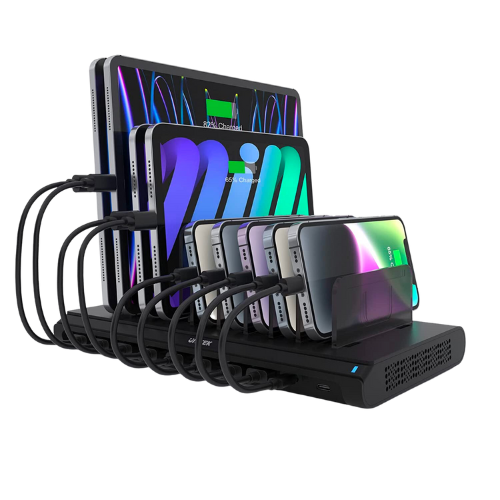
Reference image: Unitek USB charging station with multiple charging slots for phones, tablets, and accessories. Confirm the exact USB-C wattage and port layout before buying.
What is the Unitek USB Charging Station?
The Unitek USB Charging Station is a multi-device charging dock designed to charge several devices from one central station. Instead of spreading phones, tablets, earbuds, and accessories across random wall chargers, the station gives each device a slot and brings the charging cables into one organized area.
That makes the category genuinely useful. The important part is choosing the right version. Some Unitek charging stations are mostly USB-A. Others include USB-C Power Delivery. Newer models may offer much higher total wattage and more USB-C ports.
Good fit
Families, shared counters, offices, classrooms, tablets, older USB-A devices, phones, earbuds, and general device organization.
Check before buying
USB-C wattage, Power Delivery support, number of USB-C ports, tablet charging speed, laptop support, and included cables.
The port mix matters more than the number of ports
A 10-port charging station sounds powerful, but port count alone does not tell the whole story. The real question is what kind of ports those are and how much power each one can deliver.
Many older multi-device stations lean heavily on USB-A ports. That can still work for basic phone and accessory charging, especially overnight. But if you want faster charging for a newer iPhone, Android phone, iPad, tablet, or laptop, USB-C Power Delivery becomes much more important.
Do not buy by port count alone
Ten ports are only helpful if the charging power matches your devices. A station with fewer high-wattage USB-C ports may be better than a station with many low-power USB-A ports.
Charging expectations
Use this as the practical filter. The Unitek USB Charging Station can clean up device clutter beautifully, but charging speed depends on the exact ports and wattage.
| Use case | How it performs | Better buying move |
|---|---|---|
| Family charging area | Strong fit. It can keep several phones, tablets, and accessories organized in one place. | Good reason to consider it |
| Older USB-A devices | Useful for basic charging, especially overnight or for accessories. | Acceptable if speed is not the main concern |
| iPhone charging | Depends on whether you use USB-A or USB-C and the wattage of the port. | See the fastest iPhone charger guide |
| Samsung or Android fast charging | Check for USB-C PD and PPS support. Not all charging stations support Samsung’s best fast-charging behavior. | See the USB PD PPS charger guide |
| Tablets and iPads | USB-C PD ports are more useful than basic USB-A ports for faster tablet charging. | Compare 20W, 30W, and 45W chargers |
| Laptops | Only consider it if the station has a high-wattage USB-C PD port. Many laptop setups need more power. | Compare 65W vs 100W USB-C chargers |
Strong use case
This kind of station is great for keeping phones, tablets, and accessories from taking over the counter.
Still useful
USB-A ports can work for older devices, smaller accessories, and overnight charging.
Check wattage
For modern phones, tablets, and laptops, USB-C Power Delivery wattage matters more than the total port count.
Should you buy it in 2026?
Maybe — but the answer depends on which Unitek model you are buying and what devices you need to charge.
If you mainly need to organize several phones, tablets, and accessories in one place, a Unitek charging station can still be useful. It can be especially practical for families, front counters, classrooms, offices, reception areas, and shared spaces where devices pile up quickly.
But if your setup is mostly newer USB-C devices, do not settle for a low-power or USB-A-heavy model just because it has many ports. A newer USB-C PD charging station may be a better fit, especially if you want faster tablet charging or any kind of laptop support.
Great idea. Buy the right generation.
The Unitek USB Charging Station concept is still strong: one tidy spot for several devices. The buying risk is choosing an older station that does not match your newer USB-C devices. Check the ports, wattage, and charging standards before you click.
Better alternatives to consider
If you like the charging dock format but want current charging performance, look for newer USB-C charging stations with clear USB-C Power Delivery specs and enough wattage for your devices.
For family device organization
A 10-port charging station can still be a good fit if your main goal is keeping phones, tablets, and accessories together.
For modern USB-C charging
Choose a USB-C PD charging station if you need faster charging for newer iPhones, Android phones, tablets, or laptops.
You can also start with the Best Multi-Port USB-C Chargers guide or the Best USB-C Chargers guide if your main goal is charging speed.
What to check before buying
USB-C wattage
Look for clear USB-C PD wattage. A USB-C port is only useful for faster charging if it provides enough power.
USB-A limits
USB-A ports are still useful for older devices and accessories, but they are not the cleanest choice for newer fast charging.
Included cables
Many charging stations do not include every cable you need. Check whether you need USB-C, Lightning, or USB-A cables separately.
Simple buying rule
Buy a Unitek USB Charging Station if you need one organized place for several phones, tablets, and accessories. Choose a newer USB-C PD charging station if you care more about fast charging, newer devices, or laptop support.
As an Amazon Associate, USBHubShop may earn from qualifying purchases.People also ask
Is the Unitek USB Charging Station still worth buying?
Yes, if you need to organize and charge multiple phones, tablets, and accessories in one place. It is especially useful for families, counters, offices, classrooms, and shared charging areas. Just check the exact USB-C wattage and port layout before buying.
Does the Unitek USB Charging Station have USB-C?
Some Unitek charging station models include USB-C Power Delivery ports, while older or different versions may be mostly USB-A. Check the exact model listing before buying because the port mix changes the charging experience.
Can the Unitek USB Charging Station charge a laptop?
Only certain models with higher-wattage USB-C Power Delivery ports may be suitable for laptop charging. If laptop charging matters, look for clear USB-C PD wattage and compare it with your laptop’s charging requirement.
Is a 10-port charging station better than a regular USB-C charger?
Not always. A 10-port charging station is better for organization and shared charging. A regular high-wattage USB-C charger may be better for fast charging one or two demanding devices like a laptop, tablet, or phone.
What should I check before buying a multi-device charging station?
Check the number of USB-C ports, USB-C Power Delivery wattage, USB-A output, total power, supported charging standards, included cables, divider spacing, and whether it can handle your largest devices.
Should I buy an older USB-A charging station or a newer USB-C PD station?
Choose an older USB-A-heavy station if you mainly charge older devices and accessories overnight. Choose a newer USB-C PD charging station if you want faster charging for newer phones, tablets, or laptops.
Sources and product details checked
USBHubShop reviewed this update against current marketplace listings and Unitek charging station information. Similar Unitek 120W 10-port charging stations are commonly listed with 10 total ports, including USB-C Power Delivery ports and multiple USB-A ports. Some newer Unitek charging stations now offer higher wattage and more USB-C ports, so buyers should confirm the exact model, port layout, and USB-C wattage before ordering.
