
Thunderbolt 4 vs USB-C vs USB4: What the Ports Actually Mean.
Thunderbolt 4, USB-C, and USB4 often get mixed together because they can all use the same small oval USB-C connector. But they are not the same thing. USB-C describes the connector shape. Thunderbolt 4 and USB4 describe what the port may be able to do.
Same connector. Different capabilities.
The port may look identical, but speed, charging, displays, docks, and cable requirements can be very different.
Why Trust USBHubShop
USBHubShop helps readers compare USB-C hubs, chargers, cables, docking stations, and accessories using plain-English compatibility guidance.
-
Independent by design
USBHubShop does not manufacture USB-C accessories or sell its own competing charger, cable, hub, or docking station line. -
Compatibility-led, not promotional
Guides are built around device compatibility, charging standards, port support, cable requirements, and practical buyer use cases. -
Clear and accountable
Articles are written under a consistent editorial process with visible update dates, affiliate disclosures, and clear responsibility for corrections. -
Maintained with intent
USB-C standards, charging speeds, cable ratings, device requirements, and product availability can change. Guidance is reviewed and updated as the category evolves.
Affiliate disclosure: USBHubShop may earn a commission when you buy through links on this page, at no extra cost to you. We focus on helping you choose USB-C hubs, docks, chargers, cables, and adapters that match your actual device and setup.
Quick answer
USB-C is the connector. Thunderbolt 4 and USB4 are technologies that can run through that connector. A USB-C port may support basic charging and data only, or it may support high-speed data, external displays, laptop charging, docking stations, and Thunderbolt devices. The port shape alone does not tell you everything.
Do not shop by the port shape alone.
When buying a USB-C hub, Thunderbolt dock, monitor cable, or laptop adapter, check the actual standard and specs: Thunderbolt 4, USB4, Thunderbolt 5, DisplayPort support, Power Delivery, data speed, and display support.
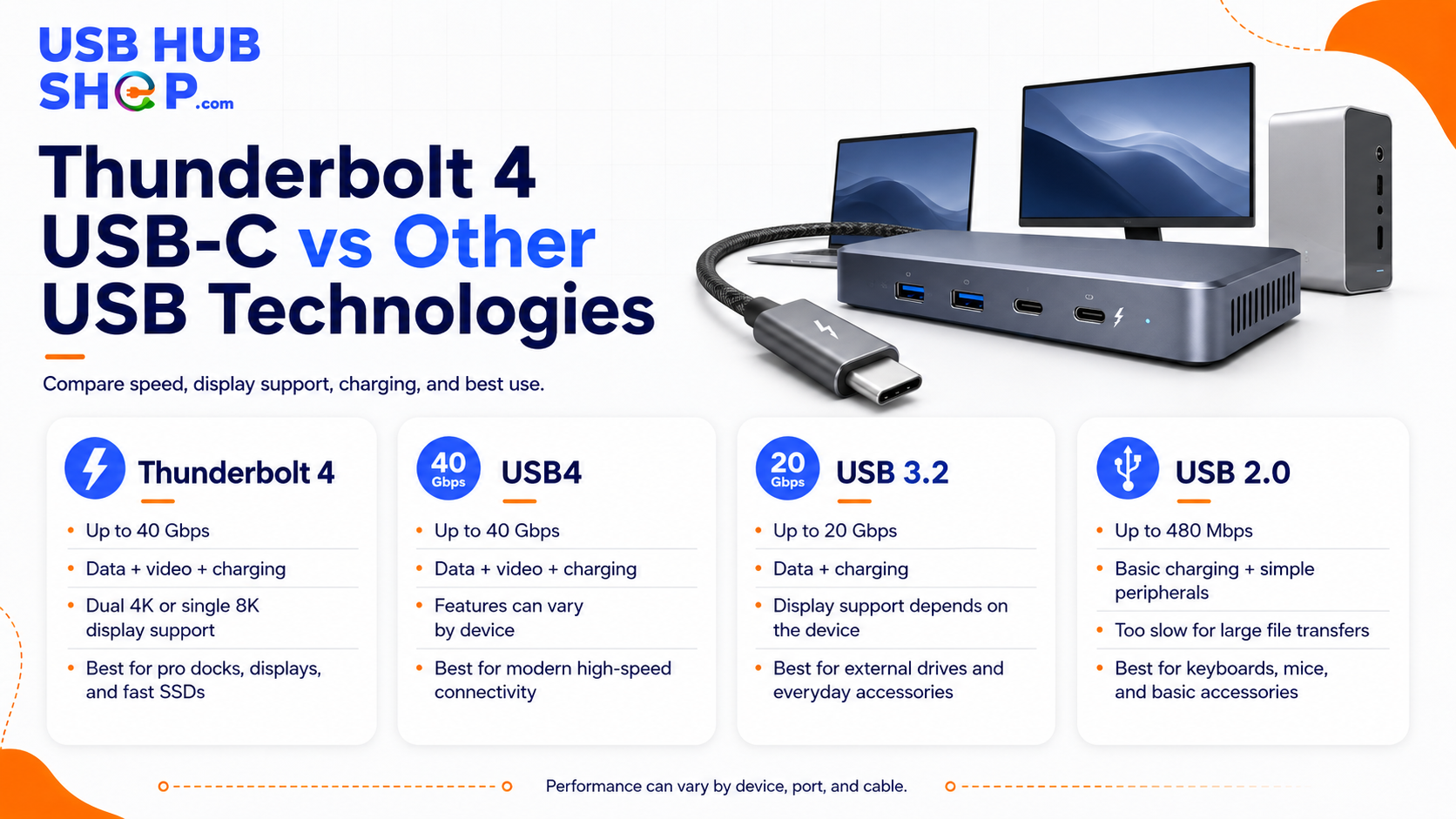
USB-C is the connector shape. Thunderbolt 4, USB4, and Thunderbolt 5 describe what that port may be able to do.
The simplest way to understand the difference
Think of USB-C as the doorway. Thunderbolt 4, USB4, Thunderbolt 5, USB 3.x, DisplayPort Alt Mode, and USB Power Delivery are the rules for what can pass through that doorway.
That is why two laptops can both have USB-C ports and behave very differently. One may only charge and transfer basic data. Another may support high-speed storage, multiple monitors, laptop charging, and a full docking station through the same-looking connector.
USB-C
The physical connector shape. It is reversible and common on phones, tablets, laptops, hubs, docks, monitors, chargers, and cables.
Thunderbolt 4 / USB4
Connection technologies that may use USB-C and can support higher-speed data, displays, docks, and more advanced workflows.
Thunderbolt 4 vs USB-C vs USB4 comparison
This table gives the plain-English version. Exact performance still depends on the laptop, cable, device, dock, monitor, and charger.
| Term | What it means | Buyer takeaway |
|---|---|---|
| USB-C | The connector shape. It does not automatically tell you speed, display support, or charging power. | Check the USB-C compatibility guide |
| USB 3.x over USB-C | Common for data transfer and accessories, but speeds vary by device and cable. | Fix slow USB-C transfer speed |
| USB4 | A newer USB standard using USB-C that can support high-speed data and display tunneling, depending on implementation. | Compare USB4 cables |
| Thunderbolt 4 | A more consistent high-performance standard using USB-C, commonly associated with 40Gbps support and stronger dock/display expectations. | Compare Thunderbolt 4 docks |
| Thunderbolt 5 | A newer high-performance standard for more demanding displays, docks, storage, and creator workflows. | See Thunderbolt 5 cables |
| USB Power Delivery | A charging standard that can allow USB-C devices to negotiate higher charging power. | Read the USB-C charging speed guide |
USB-C
USB-C tells you the shape of the port, not everything the port can do.
USB4
USB4 is a data and display technology that uses USB-C, but device support can vary.
Thunderbolt 4
Thunderbolt 4 is usually the safer choice for high-performance docks, displays, and storage setups.
Why this confuses buyers
The confusion comes from the fact that many technologies now share the same USB-C connector. A phone charger, laptop dock, monitor cable, external SSD, USB4 device, and Thunderbolt 4 dock may all plug into USB-C ports — but they may require very different support to work properly.
This is why one USB-C cable may only charge slowly, another may support fast charging, another may support fast data, and another may support Thunderbolt-level performance. The outside can look similar while the inside specs are completely different.
USB-C does not mean “everything supported”
A USB-C port may not support video output. A USB-C cable may not support high-speed data. A USB-C charger may not provide enough wattage. A USB-C hub may not support the monitor resolution you want. Always check the actual specs.
When Thunderbolt 4 is worth choosing
Thunderbolt 4 is worth choosing when you want a more predictable high-performance setup. It is especially useful for laptop docks, external monitors, fast storage, creator workflows, desk setups, and users who do not want to guess whether a random USB-C hub will do enough.
If your laptop has Thunderbolt 4 ports, a Thunderbolt 4 dock can often be a cleaner choice than a basic USB-C hub for a permanent desk. That does not mean everyone needs Thunderbolt. It means Thunderbolt is the stronger category when your setup is more demanding.
Choose Thunderbolt 4 for docks
Best when you want one-cable desk expansion with monitors, charging, Ethernet, and accessories.
Choose USB-C for simple use
Best for basic hubs, chargers, adapters, and everyday accessories when high performance is not required.
Choose USB4 carefully
USB4 can be powerful, but you still need to check the exact device, cable, and dock capabilities.
What about Thunderbolt 5?
Thunderbolt 5 is the newer performance tier for more demanding setups. It matters most for advanced users who need more bandwidth for high-resolution displays, fast storage, creator workflows, and next-generation docks.
For most everyday buyers, Thunderbolt 4 is still strong enough. Thunderbolt 5 matters more if you are buying a new premium laptop, high-end dock, fast external storage, or a display-heavy workstation and want more future room.
Thunderbolt 5 is powerful, but not everyone needs it yet.
If you are building a premium creator desk or buying a high-end laptop, Thunderbolt 5 is worth watching. If you just need a hub for HDMI, USB-A, Ethernet, or charging, Thunderbolt 4 or a good USB-C hub may be enough.
Which one should you buy?
The right choice depends on your setup, not the marketing label.
| Your setup | Best category | Why |
|---|---|---|
| Basic charging and accessories | USB-C charger, cable, or simple hub | You probably do not need Thunderbolt for everyday charging and basic accessories. |
| One HDMI monitor | USB-C hub with HDMI or USB-C to HDMI adapter | Check that your USB-C port supports video output. |
| Permanent laptop desk | Thunderbolt 4 dock or USB-C docking station | Better for monitors, Ethernet, accessories, and laptop charging. |
| Fast external storage | Thunderbolt 4, USB4, or Thunderbolt 5 | Storage performance depends heavily on port, cable, and drive support. |
| High-end creator setup | Thunderbolt 5 or premium Thunderbolt 4 | Better for demanding displays, docks, and high-bandwidth workflows. |
What to check before buying cables, hubs, or docks
Before buying, match every part of the chain: your laptop port, cable, hub or dock, charger, monitor, and external device. One weak part can limit the entire setup.
Port label
Check whether your laptop says USB-C, Thunderbolt 4, USB4, or Thunderbolt 5.
Cable rating
Use the right cable for high-speed data, displays, charging, or Thunderbolt performance.
Display support
Check HDMI, DisplayPort, monitor resolution, refresh rate, and whether the laptop supports external displays.
Charging wattage
Make sure the charger, cable, hub, and laptop all support enough power.
Dock support
Thunderbolt docks usually need Thunderbolt ports to deliver their best performance.
Device limits
Some laptops and tablets limit displays, charging, or transfer speed even with the right-looking cable.
Better buying paths
Most people do not need the most expensive cable or dock. They need the right one.
For everyday laptop users
Choose a quality USB-C hub or USB-C docking station if you need HDMI, USB-A, Ethernet, SD card, or charging support.
For premium desk setups
Choose a Thunderbolt 4 dock if your laptop supports Thunderbolt and you want a stronger one-cable workstation.
You can also start with the USB-C Compatibility Guide, the USB-C Hub vs Docking Station guide, or the Best USB-C Docking Stations guide.
Simple buying rule
Buy USB-C accessories for simple charging and basic expansion. Buy USB4 or Thunderbolt 4 gear when speed, displays, and docks matter. Consider Thunderbolt 5 for high-end future-facing workstations, creator setups, and premium laptops.
As an Amazon Associate, USBHubShop may earn from qualifying purchases.People also ask
Is Thunderbolt 4 the same as USB-C?
No. USB-C is the connector shape. Thunderbolt 4 is a connection technology that can use the USB-C connector and usually supports stronger data, display, and docking capabilities than basic USB-C.
Is USB4 the same as Thunderbolt 4?
No. USB4 and Thunderbolt 4 are related, but they are not the same. Both can use USB-C, but Thunderbolt 4 has stricter performance and feature expectations. USB4 support can vary by device.
Can I plug a USB-C device into a Thunderbolt 4 port?
Usually yes. Thunderbolt 4 ports are designed to work with many USB-C devices, but the final speed and features depend on the connected device and cable.
Do I need a Thunderbolt 4 cable?
You need a Thunderbolt 4 cable if you want full Thunderbolt 4 performance with compatible devices. For basic charging or simple USB-C accessories, a regular USB-C cable may be enough.
Is Thunderbolt 5 better than Thunderbolt 4?
Thunderbolt 5 is newer and supports more bandwidth for demanding displays, docks, storage, and creator workflows. Most everyday users can still do well with Thunderbolt 4 or a quality USB-C hub.
Why does my USB-C port not work with a monitor?
The USB-C port may not support video output, the cable may not support display use, the monitor input may be wrong, or the adapter or hub may not support the resolution you want.
Sources and product details checked
USBHubShop reviewed this update against current Intel Thunderbolt information and USB-IF USB4 / USB Type-C information. The key buyer takeaway is that USB-C describes the connector, while Thunderbolt 4, USB4, Thunderbolt 5, USB Power Delivery, and DisplayPort support describe specific capabilities that must be checked before buying cables, hubs, docks, chargers, or monitors.
