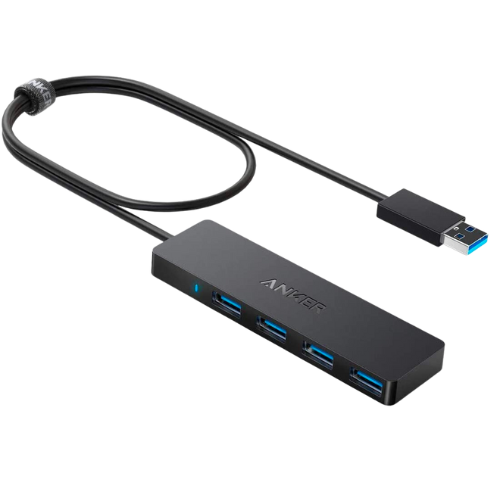
Here at USB Hub Shop, we’d like to introduce you to a product that has garnered significant attention for its ability to simplify and enhance your digital life: the Anker 4-Port USB 3.0 Hub.
Key Features of the Anker 4-Port USB 3.0 Hub
Compact, Ultra-slim Design
This model flaunts a sleek, compact design that is not only pleasing to the eye, but also highly efficient when it comes to conserving space.
Four USB 3.0 Ports
The Anker 4-Port USB 3.0 Hub comes equipped with four USB 3.0 ports, extending the connectivity of your devices in one simple step.
Extended 2-Foot Cable
The inclusion of a 2-foot extended cable gives users more flexibility in terms of device placement, ensuring comfort and convenience.
Driver-Free Usage
Forget about downloading additional drivers to use this hub. Simply plug it in and it’s ready to use – no fuss, no muss.
Plug-and-Play Functionality
Ease of use is a significant consideration for any technology purchase, and this USB hub scores high in this aspect with its plug-and-play functionality.
Benefits of Using the Anker 4-Port USB 3.0 Hub
Enhanced USB Connectivity
With the Anker 4-Port USB 3.0 Hub, you can connect up to four USB devices, such as keyboards, mice, printers, or portable drives, to your computer at the same time, expanding your USB connectivity significantly.
Space-Saving Design
Given its ultra-slim design, this USB hub doesn’t take up much space on your desk or workspace, keeping clutter to a minimum.
Rapid Data Transfer
One of the stand-out features of the Anker 4-Port USB 3.0 Hub is its ability to transfer data at high speeds. With its USB 3.0 ports, it can achieve data transfer speeds of up to 5Gbps, which is ten times faster than USB 2.0.
Ease of Use
The Anker 4-Port USB 3.0 Hub is incredibly user-friendly. Its plug-and-play functionality means no drivers are needed; simply plug it into your computer’s USB port, and you’re good to go.
Concluding Thoughts
In conclusion, the Anker 4-Port USB 3.0 Hub proves to be a fantastic choice for those looking to extend their USB connectivity. Its compact, space-saving design, coupled with fast data transfer rates and ease of use, make it a reliable and convenient solution for managing digital needs. If you’re looking to transfer large files efficiently or expand the functionality of your workspace, consider the Anker 4-Port USB 3.0 Hub. Remember, it’s more than a hub – it’s a tool to boost productivity and streamline your digital environment.