
USB 2.0 Hubs Explained: When They Are Still Enough and When to Upgrade.
USB 2.0 hubs are older, slower, and less exciting than modern USB-C hubs — but that does not automatically make them useless. For simple accessories like keyboards, mice, USB receivers, printers, scanners, and basic devices, a USB 2.0 hub may still be enough.
The problem starts when people use a USB 2.0 hub for jobs it was never meant to handle: external SSDs, fast file transfers, modern laptop docking, high-resolution webcams, or USB-C charging setups.
Old does not always mean useless.
USB 2.0 hubs can still work well for simple devices — but they are the wrong tool for high-speed storage, USB-C displays, and modern docking setups.
Why Trust USBHubShop
USBHubShop helps readers compare USB-C hubs, chargers, cables, docking stations, and accessories using plain-English compatibility guidance.
-
Independent by design
USBHubShop does not manufacture USB-C accessories or sell its own competing charger, cable, hub, or docking station line. -
Compatibility-led, not promotional
Guides are built around device compatibility, charging standards, port support, cable requirements, and practical buyer use cases. -
Clear and accountable
Articles are written under a consistent editorial process with visible update dates, affiliate disclosures, and clear responsibility for corrections. -
Maintained with intent
USB-C standards, charging speeds, cable ratings, device requirements, and product availability can change. Guidance is reviewed and updated as the category evolves.
Affiliate disclosure: USBHubShop may earn a commission when you buy through links on this page, at no extra cost to you. We focus on helping you choose USB hubs, USB-C hubs, powered hubs, chargers, cables, and adapters that match your actual setup.
Quick answer
USB 2.0 hubs are still enough for low-bandwidth accessories like keyboards, mice, USB receivers, printers, scanners, and simple dongles. They are not the best choice for external SSDs, fast flash drives, large file transfers, 4K webcams, modern USB-C hubs, HDMI output, or laptop charging. If you are buying a new hub for a modern laptop, USB 3.x, USB-C, USB4, or Thunderbolt options usually make more sense.
Use USB 2.0 for simple devices, not speed.
A USB 2.0 hub can still be practical, but only when speed does not matter. If your setup involves external storage, video, charging, or a newer USB-C laptop, upgrade instead of trying to stretch an older hub too far.
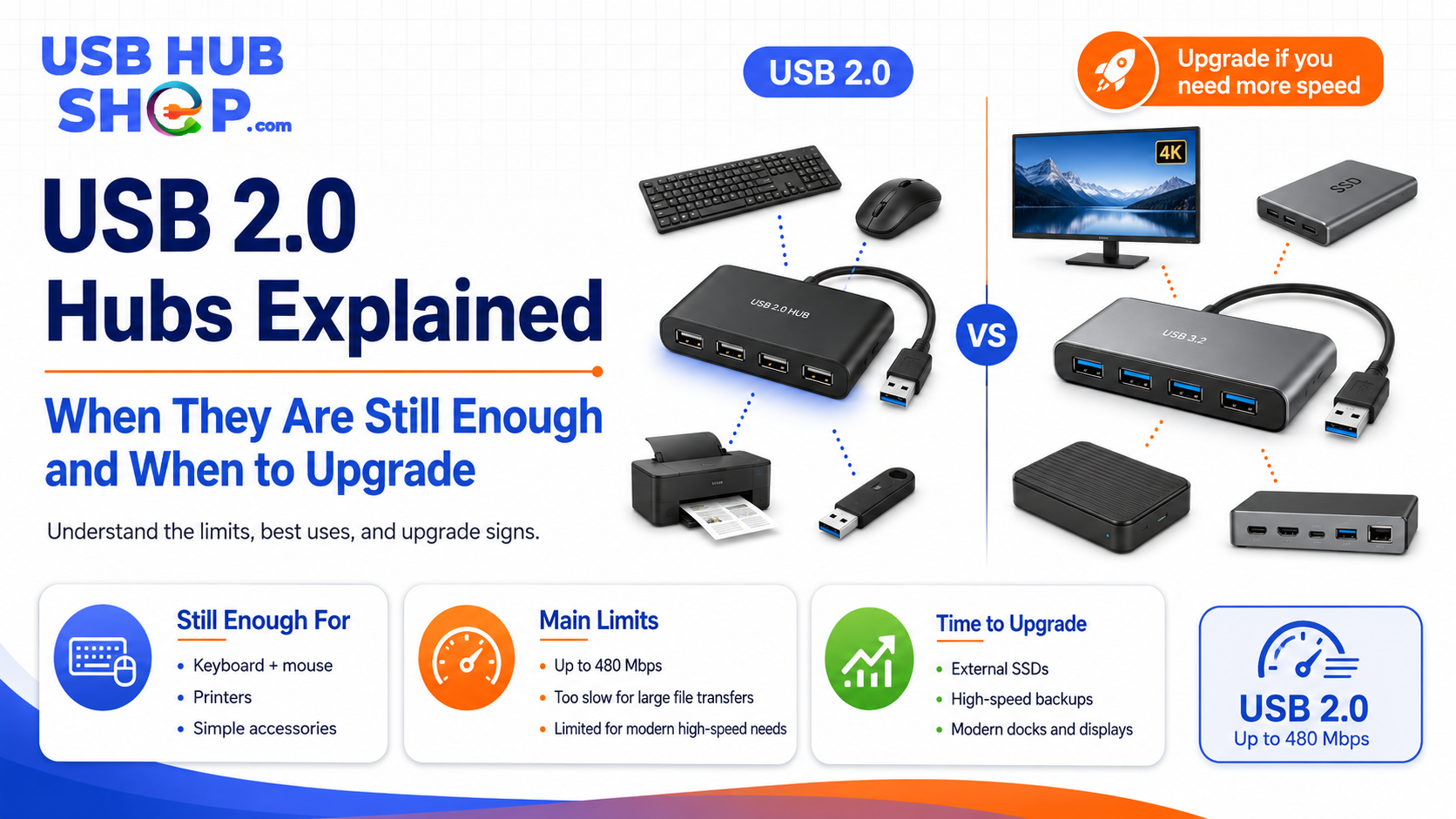
USB 2.0 hubs are still useful for simple accessories, but faster USB hubs are better for external drives, large files, and modern laptop setups.
What is a USB 2.0 hub?
A USB 2.0 hub is a hub that expands one USB connection into multiple USB ports using the USB 2.0 standard. USB 2.0 is commonly known as Hi-Speed USB and is rated up to 480 Mbps under the specification.
That speed is enough for many simple accessories, but it is much slower than modern USB 3.x, USB4, and Thunderbolt options. So the real question is not whether USB 2.0 still works. The real question is whether it fits the device you are connecting.
When USB 2.0 hubs are still enough
USB 2.0 hubs can still make sense when the connected device does not need much bandwidth. Many everyday accessories send small amounts of data. A keyboard does not need USB 10Gbps. A mouse does not need Thunderbolt. A printer does not need a premium USB-C dock.
If you already own a working USB 2.0 hub and only use it for basic accessories, you may not need to replace it.
| Device | USB 2.0 hub okay? | Best next step |
|---|---|---|
| Keyboard | Usually yes |
Keyboards use very little bandwidth.
Compare simple hubs |
| Mouse | Usually yes |
Most mice do not need high-speed USB.
See keyboard hubs |
| USB receiver | Usually yes |
Wireless keyboard and mouse receivers are usually low-bandwidth devices.
Compare compact hubs |
| Printer | Often yes |
Many printers do not need fast data transfer for normal use.
See printer hubs |
| Scanner | Sometimes |
Basic scanning may be fine, but large image workflows may benefit from faster USB.
Compare faster hubs |
| Simple USB dongle | Usually yes |
Many dongles do not require high-speed data transfer.
See USB 2.0 hubs |
Keyboard + mouse
A USB 2.0 hub is usually fine for simple input devices and wireless receivers.
Good fitPrinter or scanner
Many basic office devices do not need a faster hub for normal everyday use.
Use cautionWebcam or storage
These can be more demanding and may need a faster hub, powered hub, or direct connection.
When to upgrade from USB 2.0
You should upgrade when speed, power, or modern port support matters. USB 2.0 hubs were not designed for the way many people use laptops today: external SSDs, large files, USB-C accessories, HDMI displays, Ethernet, SD cards, and laptop charging through one hub.
If your hub feels slow, loses connections, or cannot support the devices you need, it is time to move beyond USB 2.0.
| Use case | Better choice | Best next step |
|---|---|---|
| External SSD or hard drive | USB 3.x, USB-C, powered hub, USB4, or Thunderbolt |
Storage needs more speed and often more stable power.
See drive hub guide |
| Large file transfers | USB 5Gbps or faster |
USB 2.0 can feel slow for photos, videos, backups, and large files.
Compare 5Gbps hubs |
| Modern laptop setup | USB-C hub or docking station |
New laptops often need USB-C, HDMI, Ethernet, SD card, and charging support.
See USB-C hub guide |
| 4K monitor or HDMI output | USB-C hub with HDMI or docking station |
USB 2.0 hubs do not provide modern USB-C display expansion.
See HDMI hub guide |
| Multiple power-hungry devices | Powered USB hub |
Power stability matters when several devices are connected.
Learn powered hubs |
| High-resolution webcam | USB 3.x hub or direct port |
Video devices may need more bandwidth and a stable connection.
Compare webcam hubs |
USB 2.0 vs USB 3.x vs USB-C hub
USB 2.0, USB 3.x, and USB-C are often confused. USB 2.0 and USB 3.x describe data standards and speed generations. USB-C describes the connector shape, but a USB-C port can support different data speeds and features depending on the device.
USB 2.0 hub
Best for basic accessories and low-bandwidth devices. Not ideal for fast storage or modern laptop expansion.
USB 3.x hub
Better for faster file transfers, flash drives, external drives, and everyday data accessories.
USB-C hub
Better for modern laptops, tablets, HDMI, Ethernet, SD cards, USB-C accessories, and charging passthrough.
If you need a broader foundation, start with What Is a USB Hub? and Best USB Hubs: What Still Matters Before Buying.
Powered USB 2.0 hubs: are they worth it?
A powered USB 2.0 hub can be useful if your main problem is power stability rather than speed. For example, if you need to connect several low-bandwidth USB-A devices at a desk, a powered hub may be more stable than a tiny unpowered hub.
But if you are buying a new powered hub today, a USB 3.x or USB-C powered hub usually gives you more room to grow. That is especially true if you may connect external drives, cameras, card readers, or other data-heavy accessories later.
Powered does not mean fast
A powered USB 2.0 hub may help with device stability, but it does not turn USB 2.0 into USB 3.x, USB4, or Thunderbolt. Power and speed are different buying factors.
For more help, read Powered USB Hubs Explained or compare powered USB hubs.
Should you buy a USB 2.0 hub today?
Buy a USB 2.0 hub today only if your needs are simple, your budget is tight, or the hub is being used for low-bandwidth accessories. It can still be a practical choice for a fixed desk setup with keyboards, mice, printers, and simple dongles.
Do not buy a USB 2.0 hub if you are building a modern laptop workstation, connecting external storage, using high-resolution cameras, or expecting USB-C charging and monitor support.
USB 2.0 hubs still have a place — just not everywhere.
A USB 2.0 hub is still useful for simple accessories. But if you are spending money on a new hub for a modern setup, a USB 3.x hub, USB-C hub, powered hub, or docking station will usually be the smarter long-term purchase.
Best upgrade path from USB 2.0
| Your problem | Upgrade to | Start here |
|---|---|---|
| Slow file transfers | USB 3.x or USB-C hub | Compare USB 3.0 hubs |
| External drive disconnects | Powered USB hub or high-speed USB-C hub | See drive hub guide |
| Modern laptop has too few ports | USB-C hub | See USB-C hubs |
| Need HDMI monitor support | USB-C hub with HDMI | See HDMI hubs |
| Need a full desk setup | USB-C docking station | See docking stations |
| Need many USB-A ports | Powered USB hub | See powered hubs |
USB 3.0 hub
A simple upgrade if you mainly need faster USB-A data ports for flash drives, card readers, and everyday accessories.
Modern laptopUSB-C hub
Better if your laptop needs HDMI, SD card, Ethernet, USB-C expansion, or charging passthrough.
Desk setupDocking station
Best when you want one connection for monitors, charging, Ethernet, storage, and accessories.
Simple buying rule
Keep or buy a USB 2.0 hub for simple accessories. Upgrade to USB 3.x, USB-C, a powered hub, or a docking station if you need speed, external drive stability, HDMI, Ethernet, charging, or a modern laptop setup.
As an Amazon Associate, USBHubShop may earn from qualifying purchases.People also ask
Are USB 2.0 hubs still useful?
Yes. USB 2.0 hubs are still useful for simple accessories like keyboards, mice, USB receivers, printers, scanners, and low-bandwidth devices.
When should I upgrade from a USB 2.0 hub?
Upgrade when you need faster file transfers, external drive support, USB-C laptop expansion, HDMI output, Ethernet, charging passthrough, or a more reliable desk setup.
Is USB 2.0 fast enough for an external hard drive?
USB 2.0 may work with some external drives, but it is not ideal for speed or stability. A USB 3.x, USB-C, powered hub, USB4, or Thunderbolt setup is usually better for storage.
Is a powered USB 2.0 hub better than a regular USB 2.0 hub?
A powered USB 2.0 hub can be better for stable power when several low-bandwidth devices are connected, but it does not make USB 2.0 faster.
Can a USB 2.0 hub work with USB 3.0 devices?
Many USB 3.0 devices can connect through USB 2.0 ports, but they will be limited by USB 2.0 speed and may not perform as well as they would through a faster hub or port.
Should I buy USB 2.0 or USB 3.0 hub?
Buy USB 2.0 only for simple accessories and basic use. Choose USB 3.0 or faster if you transfer files, use external drives, connect cameras, or want a more future-friendly hub.
Sources and product details checked
USBHubShop reviewed this update against current USB-IF and manufacturer-facing USB information. USB 2.0 is still widely compatible and supports Hi-Speed USB up to 480 Mbps, while newer USB 3.x, USB4, and Thunderbolt options provide much better paths for fast storage, modern hubs, docking stations, and high-bandwidth workflows.
